Schedule
我们假设现在有两个进程,一个core。两个进程在运行过程中出现了中断,在Kernel模式下处理中断并保存和恢复寄存器所需的时间等等这些都是开销。如果我们频繁切换,我们花费的时间就会过多。一般会认为花费了10%的CPU周期就是开销过大,这时候就引入了Schedule
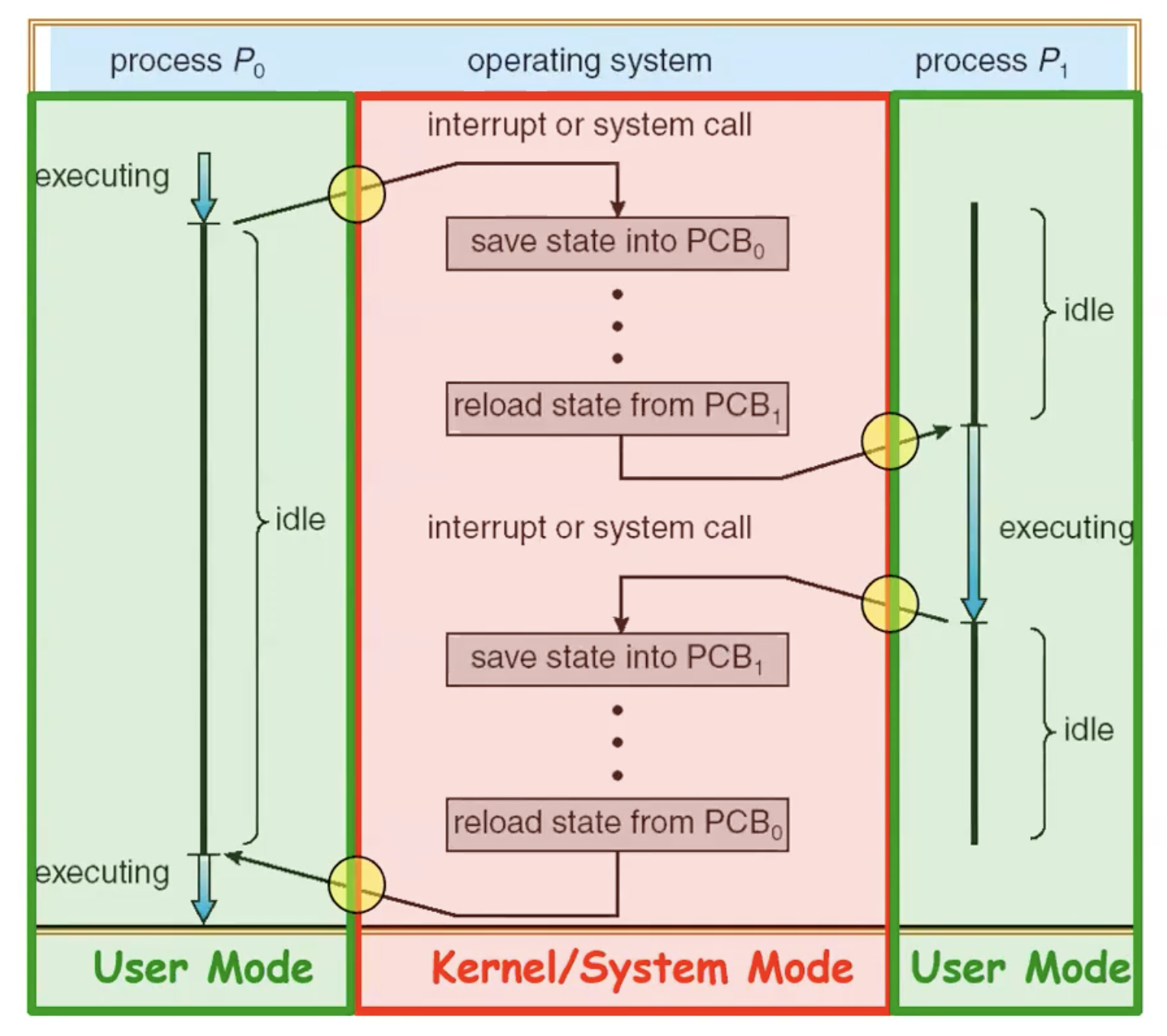 在原PPT中
Schedule的定义是,其中文是调度:
Scheduling is deciding which process/thread receives CPU time, when, and for how long
有很多的调度策略:
- Fairness
- Realtime guarantees
- latency optimization
所以说调度是一个Policy decision,而且调度是
OS的主循环。因为OS的持续工作,本质上就是:先看谁ready,选一个然后切换过去运行
Is Simple Base and Bound Enough for General Systems?
我们在Note2中第一次提及到了B&B,我们在这里提出这个问题:B&B机制对于整个系统真的足够用吗?
答案是不够的,对于真实系统Base and Bound这个机制太简单:
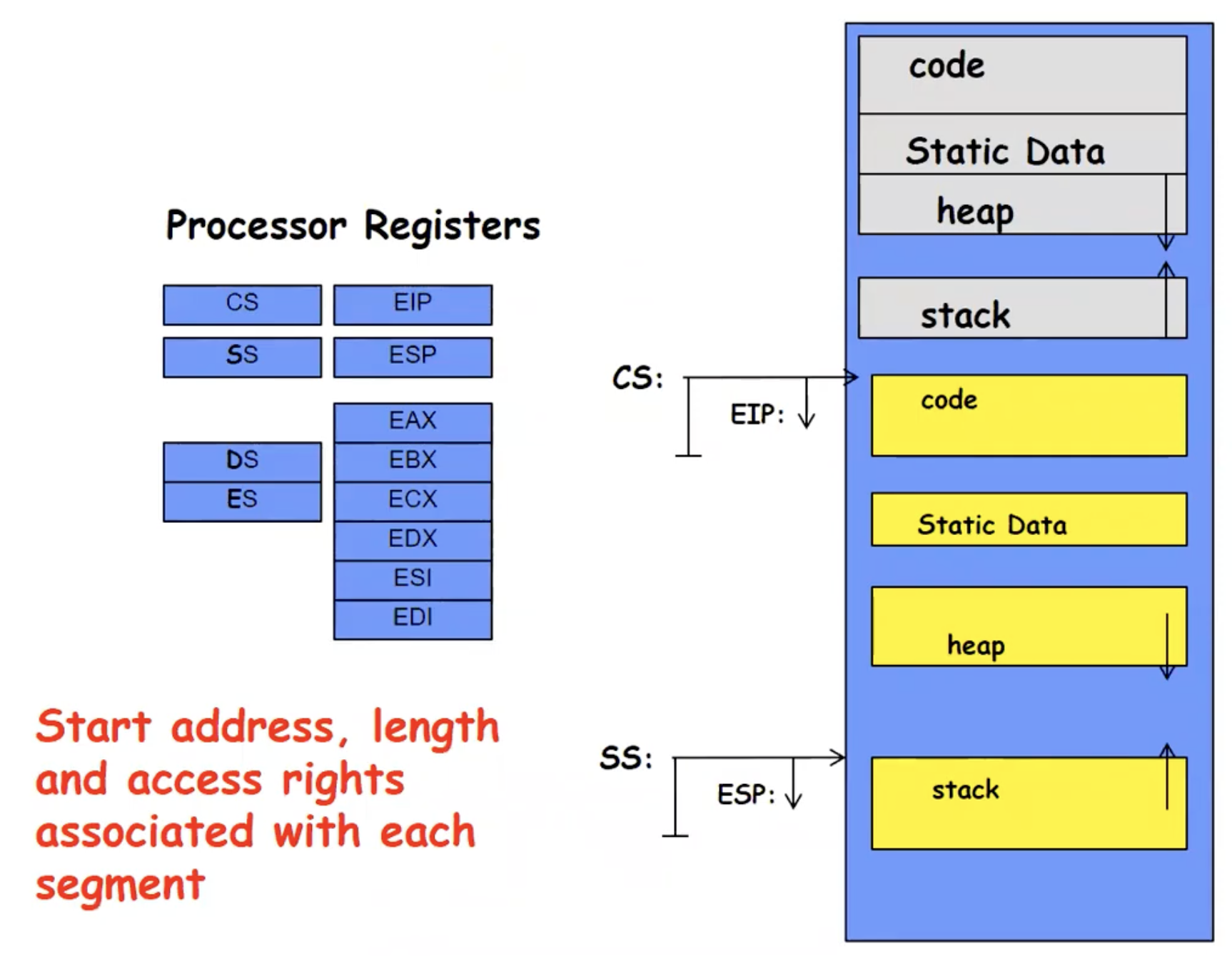
- Inflexible: 必须提前预留一整块物理内存,供未来来使用。并且堆栈还会继续变大,这块预留的空间必须很大才可以
- Fragmentation:
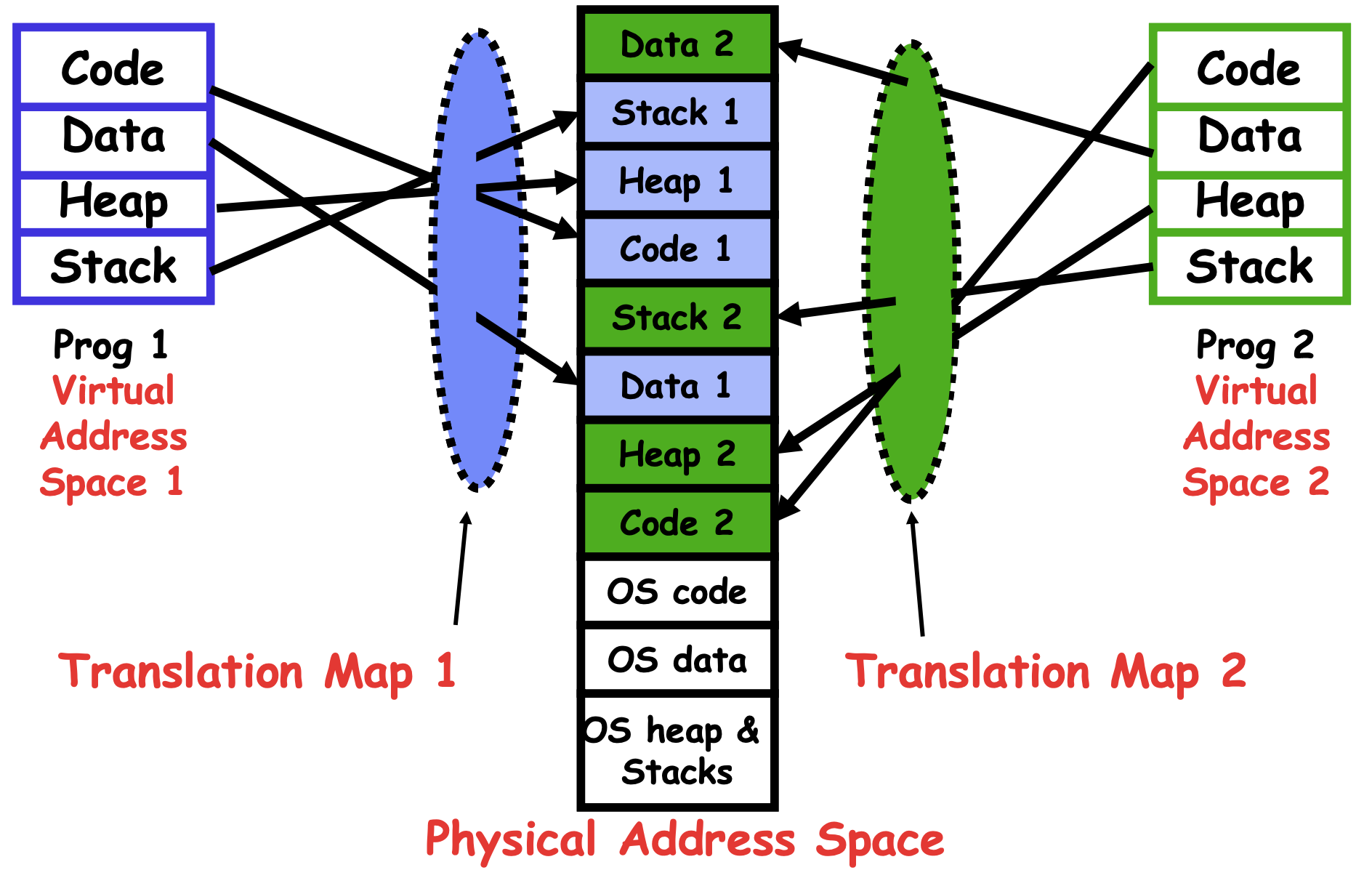
B&B的基本前提是一个进程对应一整块连续内存,现实中进程会创建退出,并且不同进程占用大小不一样,释放之后会留下很多空洞。剩的很多但是空不出来一整个大块,这就叫做external fragmentation(外部碎片) - Sharing: 很难在进程之间共享数据,很难在进程和kernel之间共享数据,往往只能通过kernel间接通信 所以说现代主要用的是Pages tables / virtual memory
Implementing Safe Kernel Mode Transfers
我们先回忆一下User → Kernel 的三种方式,我们的初衷是不能让恶意或者错误的用户程序让内核本身遭到破坏。
先前条件
在实现安全进入内核之前,我们要明确两个条件:
- 在进入
Kernel Mode的时候,要原子性地转移到明确的Kernel入口点。原子性就是在表示内核入口一定要精确再精确,只能通过固定入口来进入,不能让用户随意跳到任何位置 - Seperate kernel stack: 不能使用用户生态栈,而要切到独立的
kernel stack。第一个原因是User stack不可信,用户程序不可预测; 第二个原因是User stack会被修改,这时候内核逻辑会被直接劫持。 这里在给个例子详细解释一下为什么需要Kernel stack而绝不能相信User stack:
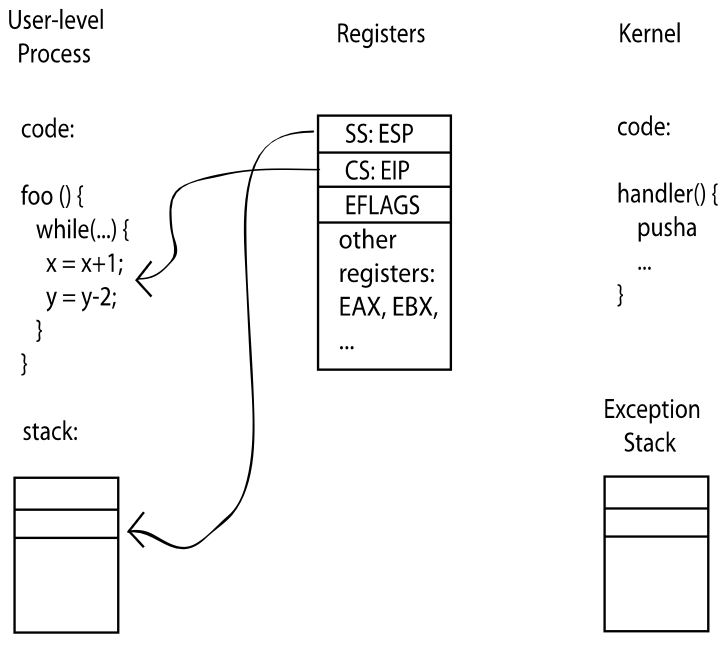
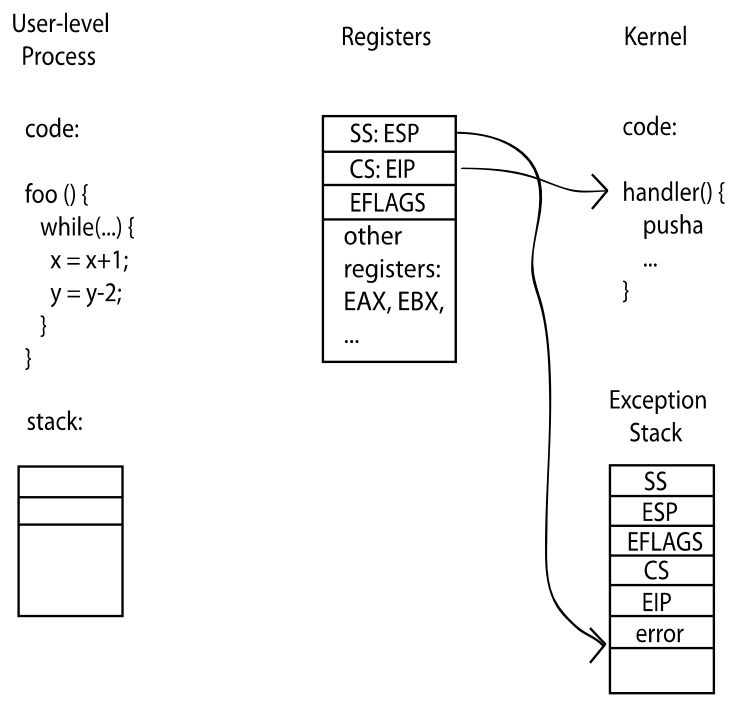 第一张图片是在运行用户程序,当前CPU寄存器里面寄存着SS:ESP → 用户栈,CS:EIP → 当前执行位置,还有其他的寄存器,这些寄存器保存的都是
thread的上下文.
第二张图片进入了Kernel Mode,触发事件有可能是三种转换方式中的一种,这时候User stack就切换到了Kernel stack,同时CPU把上下文自动压到Kernel stack,并且执行handler。handler执行结束后就restore context,并且重新切回User mode和User stack
那我们如何限制内核入口点呢?
- 我们使用
indirection table:Interrupt handler tableandsystem call table
System Call Handler
这是第一种安全进入内核的机制,流程如下: Vector through well-defined syscall entry points!
- Table mapping system call number to handler System call stack
- System call handler works regardless of state of user SP register Locate arguments
- In registers or on user (!) stack Copy arguments
- From user memory into kernel memory
- Protect kernel from malicious code evading checks Validate arguments
- Protect kernel from errors in user code Copy results back
- Into user memory
Interrupt Control
这是第二种安全进入内核的机制。与syscall不同的是,这是由硬件触发的并且通常无参数。它的流程如下:
Vector through table of Interrupt handlers
- Table mapping interrupt number to handler Kernel interrupt stack
- Interrupt handler works regardless of state of user SP register Interrupt processing not visible to the user process:
- Occurs between instructions, restarted transparently
- No change to process state
- What can be observed even with perfect interrupt processing? Interrupt Handler invoked with interrupts ‘disabled’
- Re-enabled upon completion
- Non-blocking (run to completion, no waits)
- Pack up in a queue and pass off to an OS thread for hard work
- wake up an existing OS thread
Interrupt Controller
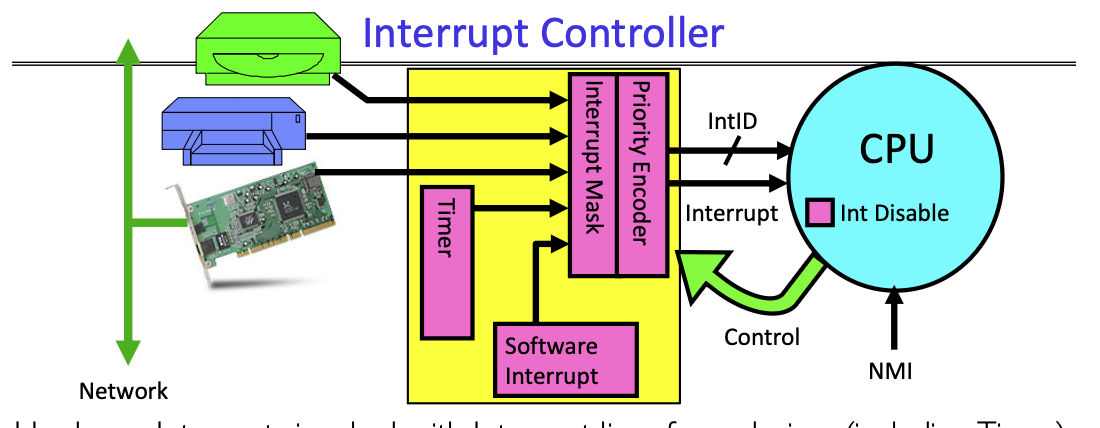 上图是
上图是Interrupt Controller的执行过程:
- 首先接受中断信号,可能来自网卡,磁盘或者定时器等等等等
- 然后决定处理哪个中断: 这其中会根据
interrupt ID,mask,priority等等内容来决定先处理哪个中断 - CPU关闭中断,但是
NMI(Non-Maskable Interrupt)是不可关闭的,它用于紧急硬件错误处理
受控接口
我们很明显能意识到,System Call是唯一的通道: OS想让User以尽可能小并且功能完整的接口来让用户访问内核:
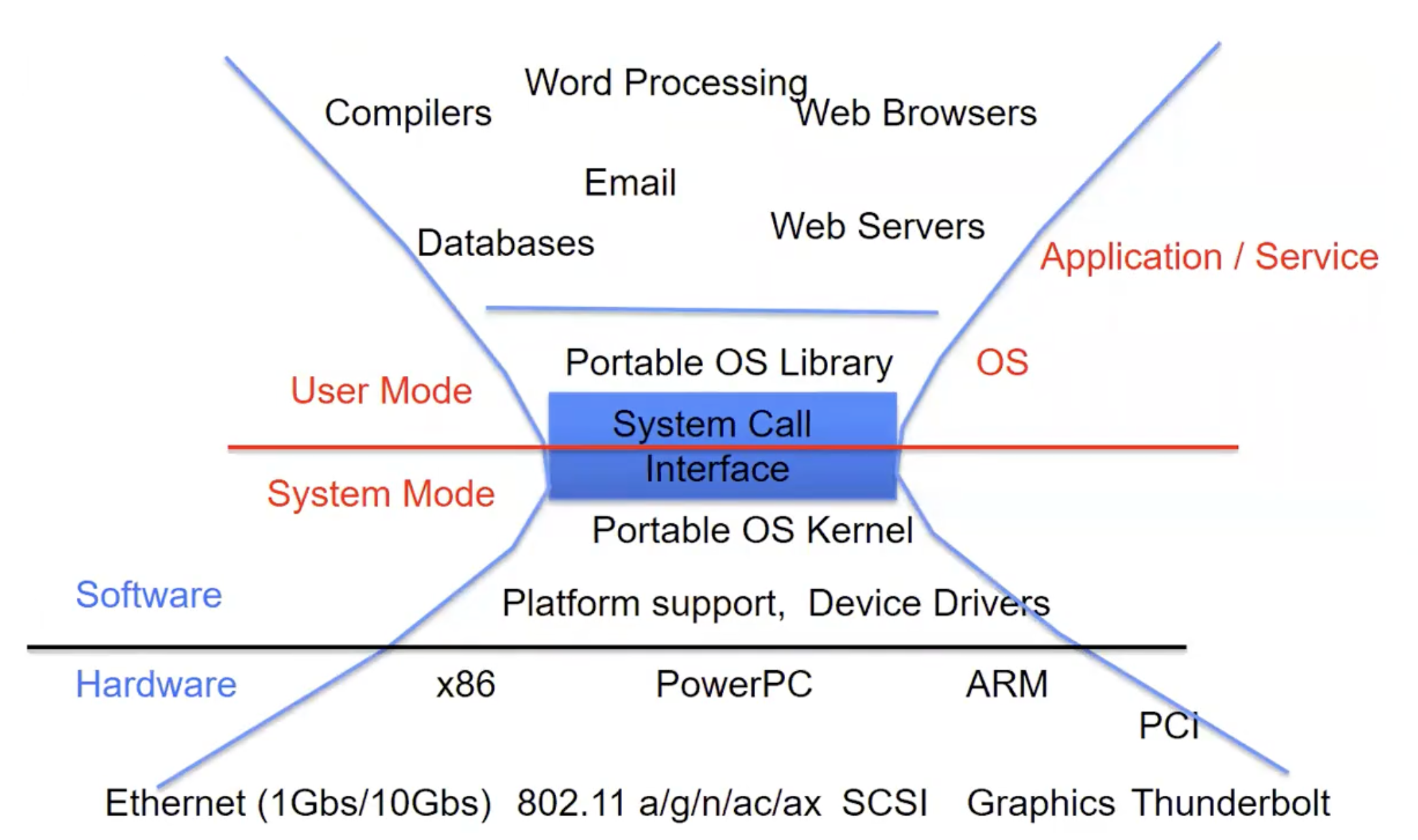 我们再次看下面这个图片时,能对流程有更深的理解
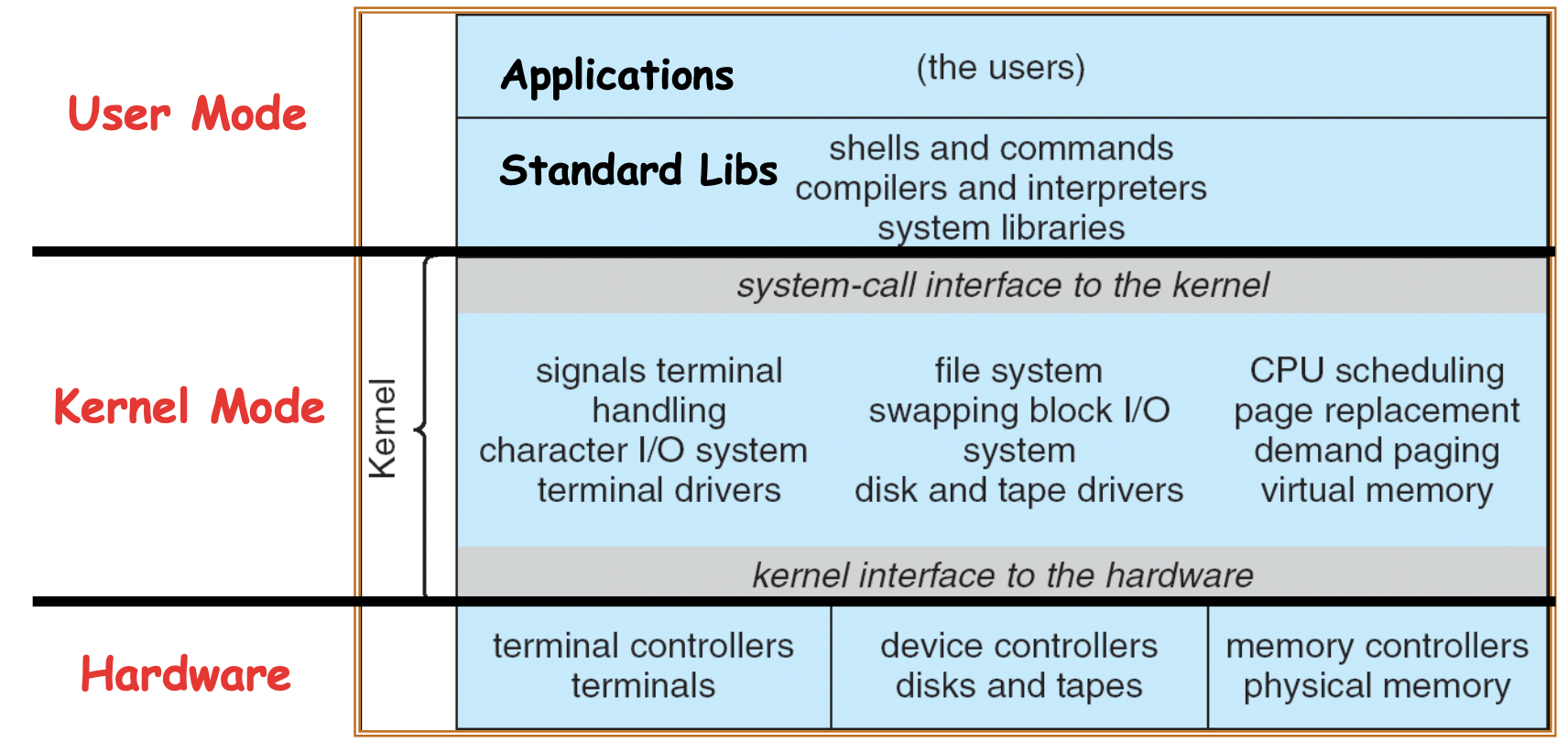 用户代码在
用户代码在Application这一层,代码可能链接了某些标准库,比如libc等等。然后这些库可能会向内核部分发起系统调用,将会在系统模式下运行内核代码的部分
Web Server实例
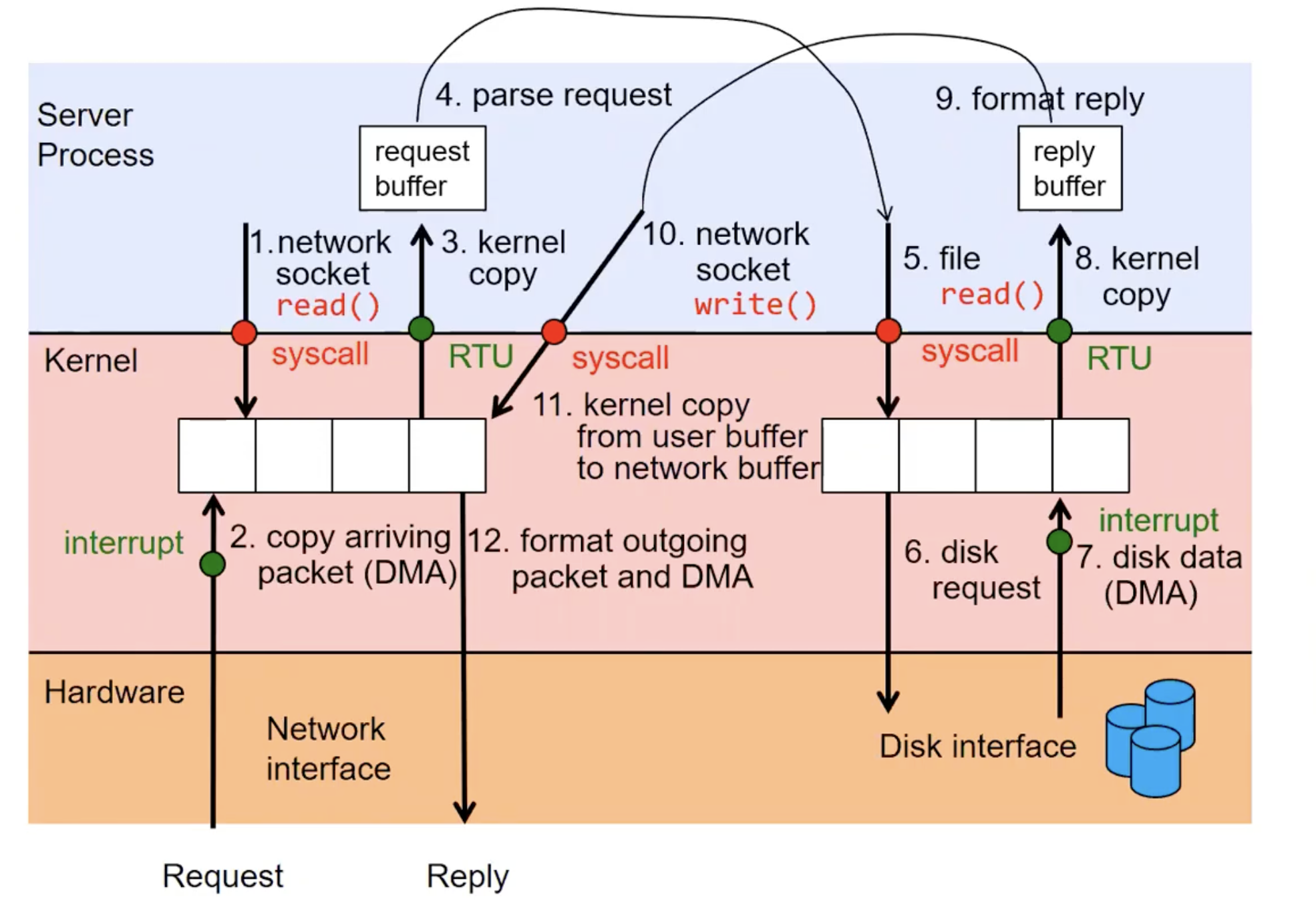 上图对于一个简单的
Web Server的流程,综合了之前所学的大部分知识。过程非常详细,可以看到的是: 在整个过程中,syscall和数据拷贝发生的很频繁,User mode和Kernel Mode边界切换非常频繁,整个过程伴随着大量开销。
Process Management
我们该如何管理Process state?回答这个问题之前,我们首先要知道:
Process是由Process创建并管理的!
这不是一个先有鸡还是先有蛋的问题,实际上第一个Process是在内核启动的时候被启动,通常称为init进程。一旦init启动之后,它可能会启动一个shell,来执行fork操作进行创建更多进程
Process Management API
- exit – terminate a process
- fork – copy the current process
- exec – change the program being run by the current process
- wait – wait for a process to finish
- kill – send a signal (interrupt-like notification) to another process
- sigaction – set handlers for signals
Exit
#include <stdlib.h>
#include <stdio.h>
#include <string.h>
#include <unistd.h>
#include <sys/types.h>
int main(int argc, char *argv[])
{
/* get current processes PID */
	pid_t pid = getpid();
	printf("My pid: %d\n", pid);
	exit(0);
}
注意就算不显示退出它也有隐式退出机制
Fork
#include <stdlib.h>
#include <stdio.h>
#include <unistd.h>
#include <sys/types.h>
int main(int argc, char *argv[]) {
	pid_t cpid, mypid;
	pid_t pid = getpid(); /* get current processes PID */
	printf("Parent pid: %d\n", pid);
	cpid = fork();
	if (cpid > 0) { /* Parent Process */
		mypid = getpid();
		printf("[%d] parent of [%d]\n", mypid, cpid);
	} else if (cpid == 0) { /* Child Process */
		mypid = getpid();
		printf("[%d] child\n", mypid);
	} else {
		perror("Fork failed");
	}
}注意fork出来的新进程拥有一个新的PID,并且新进程只包含一个线程。parent和child一开始几乎一模一样,其中包括了地址空间,全局变量,堆栈,文件描述符(fd)等等
更需要注意的是,
fork操作之后代码会执行两次! 这就相当于fork()执行完毕后,两个进程从同一行代码继续往下跑
同时注意fork()函数的返回值
| 返回值 | 所在进程 |
|---|---|
| > 0 | parent |
| = 0 | child |
| < 0 | error |
Exec
…
cpid = fork();
if (cpid > 0) { /* Parent Process */
	tcpid = wait(&status);
} else if (cpid == 0) { /* Child Process */
	char *args[] = {“ls”, “-l”, NULL};
	execv(“/bin/ls”, args);
/* execv doesn’t return when it works.
So, if we got here, it failed! */
	perror(“execv”);
	exit(1);
}
…
Parent Process等待Child Process执行完毕,同时Child Process把自己变成另外一个程序。exec不创建新进程,而是替换当前进程的内容
Wait
int status;
pid_t tcpid;
…
cpid = fork();
if (cpid > 0) { /* Parent Process */
	mypid = getpid();
	printf("[%d] parent of [%d]\n", mypid, cpid);
	tcpid = wait(&status);
	printf("[%d] bye %d(%d)\n", mypid, tcpid, status);
	} else if (cpid == 0) { /* Child Process */
		mypid = getpid();
		printf("[%d] child\n", mypid);
		exit(42);
}
…父进程等待子进程结束,wait()是为了获取child的退出状态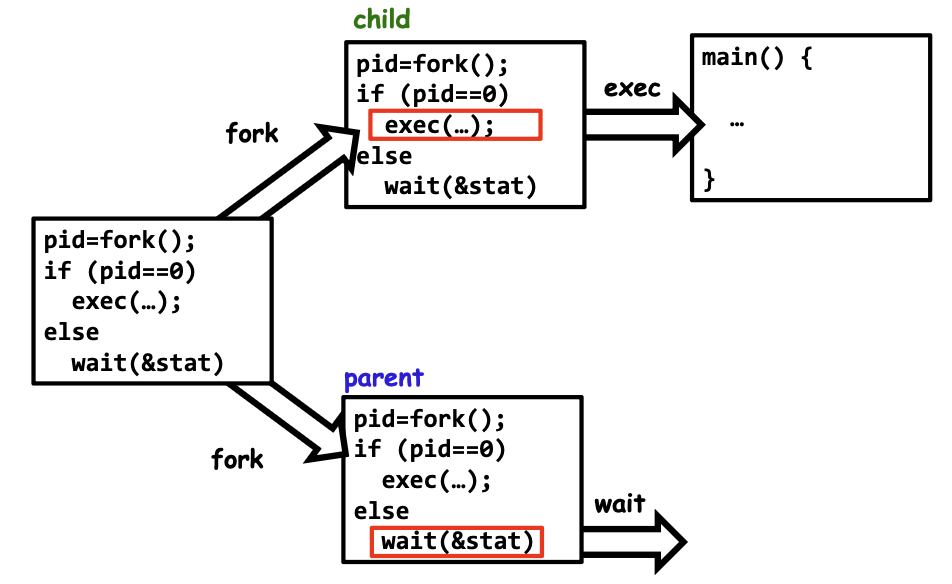
Kill
#include <stdlib.h>
#include <stdio.h>
#include <sys/types.h>
#include <unistd.h>
#include <signal.h>
void signal_callback_handler(int signum) {
printf(“Caught signal!\n”);
exit(1);
}
int main() {
	struct sigaction sa;
	sa.sa_flags = 0;
	sigemptyset(&sa.sa_mask);
	sa.sa_handler = signal_callback_handler;
	sigaction(SIGINT, &sa, NULL);
	while (1) {}
}其中while(1) {}是无限循环,当收到sigint( Ctrl + C )会发生什么?如果没有handler,进程会直接被杀死。如果注册了handler
sa.sa_handler = signal_callback_handler;
sigaction(SIGINT, &sa, NULL);那么当进行Ctrl + C时就不再是默认行为,而是你定义的行为
Caught signal!
exit(1)
Sigaction
- SIGINT – control-C
- SIGTERM – default for kill shell command
- SIGSTP – control-Z (default action: stop process)
- SIGKILL, SIGSTOP – terminate/stop process
- Can’t be changed with sigaction